Gmail + IMAP = Email Confusion

by Adam on August 12, 2008 · 5 comments

in Technology

I am embarrassed for admitting this, but I’m having the hardest time figuring out how I want to set up my email on my iPhone. I went through and set up IMAP on my Apple Mai land iPhone last night, and it was just being a huge pain, was trying to download stuff all night long, and still wasn’t working right this morning - kept disconnecting, and I’m not sure what else…so I switched back to POP email this morning with my Gmail.

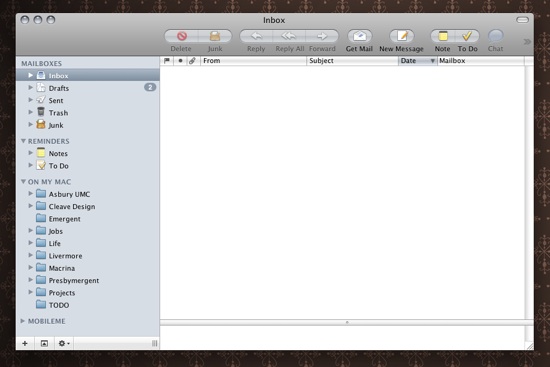
I would love any advice for what I need to do to make my iPhone email experience a good one. As you can see from above, I love my folders. And many of those folders have sub-folders, with folders in them as well. It’s how I like to stay organized. But if I switch to IMAP, then it seems like I have to re-create all those within Gmail (although they’ll be labels) and I’m just not sure how I want to organize everything.

At any rate, I know everyone tells me that IMAP is the way to go and how I should be doing my email, but it didn’t seem to work too well last night and seemed to make my Apple Mail (where I spend most of my time with email) more chaotic and confusing than it needed to be. But I also want to be able to use my iPhone in the most efficient way, and I’m guessing with POP, I will be able to access all of my email with it, and then when I come home, it’ll all just get downloaded to my computer again, and I’ll have to go through and delete and sort…which is okay - but seems like there would be a more efficient way to do email. I, for some reason or another, just can’t seem to figure it out.

{ 5 comments… read them below or add one }

Rich 08.12.08 at 6:32 am

I’m on my way out right but will try to drop a note to you later. In the meantime, do a search at lifehacker.com for iphone and IMAP. They have some really good notes there.

ian 08.12.08 at 7:18 am

I used the gmail setup button with mail on the iPhone and it worked like a charm. It uses IMAP by default in that case.

Andy James 08.12.08 at 7:35 am

I’ve been using IMAP for many years and love it. However, it takes some getting used to!

First off, recognize that gmail’s IMAP is very different from MobileMe’s IMAP. If you want to use folders to organize things and don’t want to have to rethink everything about how you’ve done email, use MobileMe — you can just move your folders from “On My Mac” over to MobileMe, then they’re there. Plus, that means you can access all those emails from the web or iPhone. It seems crazy to do, but it just works.

As for connecting and disconnecting, that’s actually normal. It just takes a while to go through and upload all those messages you’re putting on the server. I have nearly 500MB of email stored in IMAP on my MobileMe account, and I remember days when the blasted thing took HOURS to do something extremely simple. But just give the machine the time it needs to work, and everything will eventually be where it is supposed to. You actually had the right idea — start getting it set up, then go to bed or leave the house for a while. When you get back, all the network copying will be done, and life will be good.

Finally, as for gmail via IMAP, that’s a whole different story. If you’d like some advice on dealing with that, let me know and I’ll send some thoughts your way. It’s just entirely different — and if you’re just getting started with IMAP, it might be good to start with only one model :-)

Hope this is helpful.

jpkang 08.12.08 at 5:11 pm

I think Gmail was flaky yesterday, which may also have factored into what you were experiencing.

john.jones.name 08.17.08 at 6:36 pm

Hey there

the first thing to note is yes IMAP is the way to go especially if you deal with folders they annoying thing is gmail has a differant way of dealing with these things because of the whole tags mentality that the web interface has also gmail’s IMAP server is a little strange to apple mail and other clients not mapping the inbox and other folders to the correct place make sure you have the spam, sent etc mapped correctly select the folder and then follow this guide
http://www.johnjones.me.uk/2007/12/09/setup-apple-mail-with-google-email-gmail/

also now on the iPhone version 2 software I would say exchange sync in the best way to use it as everything contacts calendar etc gets synced if you dont have a exchange server apple mobile me for syncing contcts etc and a gmail imap account ( to post out of for the mobile me account gmail is the smtp route since apple is so bad at relay set this account always to relay out for every account)

hope this helps

regards

John Jones
http://www.johnjones.me.uk

Leave a Comment

You can use these HTML tags and attributes: <a href="" title=""> <abbr title=""> <acronym title=""> <b> <blockquote cite=""> <cite> <code> <del datetime=""> <em> <i> <q cite=""> <strike> <strong>